

GOFO Status Meanings: What Your Tracking Is Telling You
Your GOFO status is the latest scan on your tracking page. Each one marks a point in the trip, from the seller’s label to your door. Most updates are routine and need nothing from you. Pick a stage below to see each GOFO status in plain English, with what normally comes next.
- Shipment information received
- The seller created a label. GOFO does not have the box yet.Next: a pickup scan, usually within 1 to 3 business days
- Picked up
- GOFO collected the parcel from the seller or a partner.Next: a scan at a GOFO hub
- Arrived at GOFO hub
- The parcel reached a GOFO sorting hub.Next: a departure scan
- Departed facility
- It left the hub on a truck.Next: arrival at the next hub or your local station
- In transit
- It is moving between hubs, sometimes across several states.Next: a new hub or regional facility scan
- Arrived at regional destination facility
- It reached the GOFO station that serves your area.Next: Out for delivery, often within 1 to 2 days
- Out for delivery
- A driver has it on today’s route.Next: Delivered, usually the same day, sometimes in the evening
- Delivered
- The driver marked it delivered and took photos.Next: check the photo and the usual drop spots
- Delivered, with a place named
- Some scans add the spot, such as front door or mailroom.Next: look in that exact place first
- Delivery attempted
- The driver could not finish the drop, for example no access.Next: another attempt, or call GOFO with access details
- Address problem (wording varies)
- The label address is incomplete or the driver could not find it.Next: call GOFO and the seller with the full address
- Delay or exception (wording varies)
- Something slowed it down, such as weather or a missort.Next: a new scan within a few days
- Returned to sender
- The parcel is going back to the seller.Next: contact the seller for a reship or refund
Exact wording can vary slightly between sellers and tracking pages. Last updated: 23 November 2026 · TrackGofo is independent and not part of GOFO.
On this page
- How a GOFO status updates
- What does “Shipment information received” mean?
- What does “In transit” mean on GOFO?
- What does “Arrived at regional destination facility” mean?
- What does “Out for delivery” mean?
- What does “Delivered” mean if you don’t have it?
- GOFO statuses that need action
- GOFO status on Temu, Shein and other apps
- Frequently asked questions
- Sources
- See your current GOFO status
How a GOFO status updates
GOFO scans a parcel when it changes hands or buildings. That happens at pickup, at each hub, at your local station and at your door. Between those points, nothing is scanned. As a result, a parcel on a long truck route can keep the same GOFO status for a day or more.
Scan times usually show the local time where the scan happened. So a 9 PM scan in Los Angeles is midnight in New York. Keep that in mind before you decide a scan looks wrong.
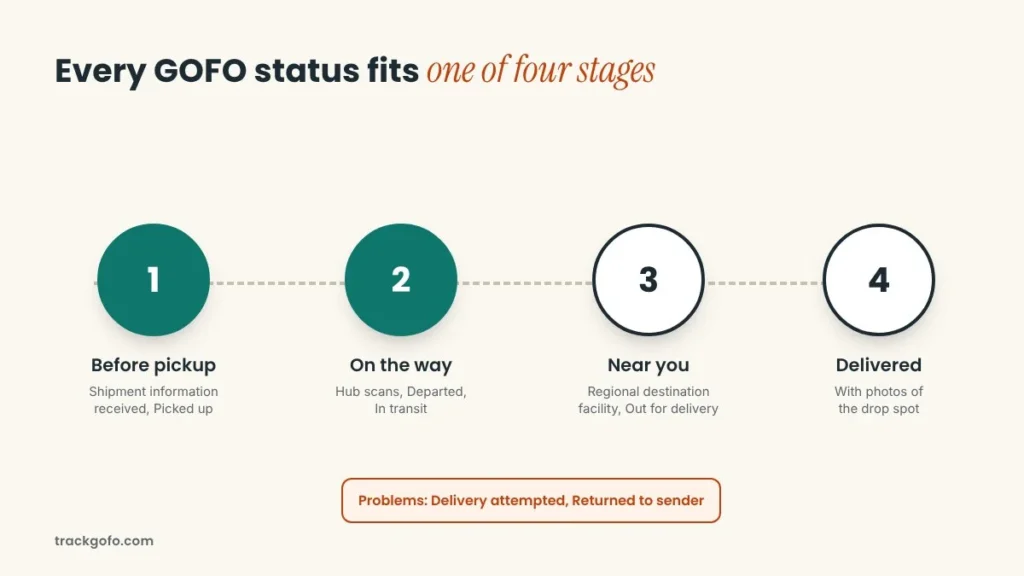
What does “Shipment information received” mean?
It means the seller created a shipping label and sent the details to GOFO. GOFO does not have the box yet. This is the most misread GOFO status, because people expect movement that cannot happen until the seller hands the parcel over. One to three business days here is normal.
If it stays longer than about six business days, the delay sits with the seller. Our stuck package guide explains who to contact at each stage.
What does “In transit” mean on GOFO?
In transit means the parcel is moving between GOFO hubs, usually on a linehaul truck. GOFO runs large hubs in Newark and Los Angeles, plus hubs in places like Dallas and Houston, so a cross country parcel may pass through several. The status can stay the same for one to three days on a long route.
What does “Arrived at regional destination facility” mean?
Your parcel reached the GOFO station that serves your area. This is usually the last stop before a driver takes it out. Out for delivery often follows within one or two business days. If this GOFO status stays for four business days, call GOFO and confirm your full address.
What does “Out for delivery” mean?
A local driver has your parcel on today’s route. GOFO does not give delivery windows, and routes can run into the evening. Therefore, wait until the end of the day before you worry. If the status still says Out for delivery the next morning, the parcel likely missed its route and will go out again.
What does “Delivered” mean if you don’t have it?
Delivered means the driver marked the drop as complete. GOFO asks its drivers to take three to five photos showing the label, the address and the exact spot. So open the delivery photo first, because it usually shows where the parcel went. If the door in the photo is not yours, follow our delivered but not received plan.
GOFO statuses that need action
Only a few updates ask you to do something. Here is what each one needs, and from whom.
- Delivery attempted. Call GOFO with gate, buzzer or access details, because the driver only sees what is on the label.
- Address problem. Contact GOFO and the seller with the complete address, including any unit number.
- Returned to sender. Contact the seller. GOFO cannot turn a returning parcel around.
- No new status for five business days. Contact GOFO first, then open a case with the seller.
For phone numbers and hours in your time zone, see our GOFO customer service guide.
GOFO status on Temu, Shein and other apps
Shopping apps often show their own wording instead of the GOFO status. For example, an app might say “Arrived in destination country” or “With local carrier” when GOFO shows Picked up. The GOFO tracking page usually has more detail, including the delivery photo. Our Temu and Shein tracking guide shows how to find the GOFO number inside each app.
Frequently asked questions
Why does my GOFO status say delivered before the parcel arrived?
Sometimes a driver scans a parcel as delivered a little early, often near the end of a route. Shein, for example, tells US shoppers that tracking can show Delivered before the parcel arrives and suggests waiting up to 48 hours. Check the delivery photo first, then act if nothing turns up.
Why did my GOFO status go backwards?
A parcel that shows a hub scan after a local station scan was probably missorted. It went to the wrong building and is travelling back. This usually adds one to three days. If the status keeps bouncing between the same two places, call GOFO and ask them to check the route.
How often does GOFO update tracking?
GOFO updates tracking when a parcel is scanned, not on a schedule. Scans happen at pickup, at each hub, at your local station, when the driver loads it and at delivery. So a GOFO status can change several times in one day, then stay the same for a day or two on a long truck trip.
What is the difference between “Picked up” and “Shipment information received”?
Shipment information received means only the label exists. Picked up means GOFO actually has the parcel. That is why the first status can last a few days, while Picked up usually changes quickly to a hub scan. If you see Picked up, the parcel is in GOFO’s network.
See your current GOFO status
Paste your tracking number to see the latest GOFO status and the full scan history. Then come back to the tabs above to read what it means.
TrackGofo is an independent tracking service. It is not affiliated with, endorsed by or operated by GOFO Express. GOFO is a trademark of its owner.